Body Envy
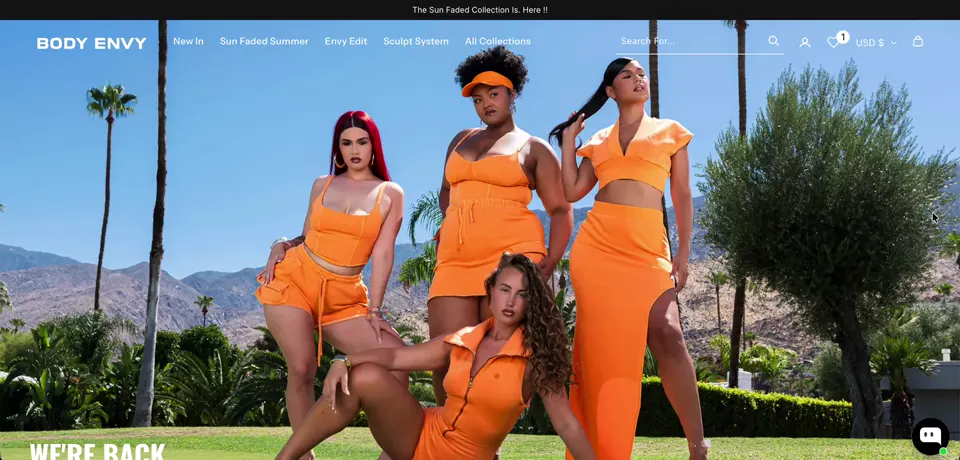
getbodyenvy.com ↗Body Envy is an activewear brand that closed its store during a rebrand toward lifestyle activewear. We redesigned the store on Prestige with Figma designs for every key page, a sticky product gallery and cleaner collection cards.
- Niche
- Fashion
- Engagement
- Redesign
- Services
- Figma design, Prestige theme customization, mobile optimization, app integration
- Platform
- Shopify
The brief they came with
Body Envy sells activewear and waist trainers, from the Body Envy 2 Strap Waist Trainer to the Azul Hoodie, the Black Flight Quilted Bomber and the Azul Bella Joggers. The brand was moving toward lifestyle activewear, and the store stayed closed until the new site was ready. The team wanted a clean, premium store that did not look like a standard theme. They pointed to SKIMS and Oh Polly.
The brief covered Figma designs for the homepage and product page. It then added the collection page, mobile menu, header, cart drawer and checkout styling, followed by the build on Prestige. Most customers shop on phones, so mobile came first on every page.
The problem
The store was closed. Body Envy took the old site down for the rebrand, so every delay pushed back the day customers could order again. The design had to be settled before the build, so the build could go into building, not redrawing.
Most customers shop on phones. A product page with photos stacked down the screen pushes color, size and Add to Cart below the fold. On a small screen, that is a long scroll before anyone can buy.
The store had to stop reading as a theme. The team wanted clean spacing, large product photos and a white page. That is closer to SKIMS and Oh Polly than to a standard Shopify grid.
Product cards showed the wrong label. Cards displayed a collection name like The Essentials instead of what the item was. One product can sit in several collections, so pulling a name automatically risked showing a random one.
Each color is its own product. The colors of one style live on separate product pages, so standard variant swatches would not connect them.
What we built
- 01 Homepage design in Figma, section by section We designed the homepage first: hero banner, category cards, new arrivals, a lifestyle banner, email and SMS signup, a trust bar and the footer. Photos from the old site fought the new direction, so we swapped in editorial placeholder images in a clean, neutral palette. Before the build, we confirmed each section could be matched in Prestige. We also flagged which sections would need custom CSS or Liquid.
- 02 Product page built around color, size, Add to Cart We designed two product page variations, and the team chose Variation 1. Photos sit in a swipe gallery with arrows and dots, with no thumbnails. The flow runs color, then size, then Add to Cart. The Size Guide sits beside the sizes, and there is no quantity selector. Out of stock swatches are crossed out, and the button becomes Notify Me When Restocked. Complete the Look sits under the tabs, followed by More In This Color, More You'll Love and Recently Viewed.
- 03 Collection page, mobile menu and slide cart Next we designed the collection page, mobile menu, header, slide cart and checkout styling, each for desktop and mobile. Small badges like Best Seller appear only where needed. On mobile, the header stays fixed and the category tabs scroll sideways. The slide cart design has a free shipping progress bar and a Complete the Look row. We linked everything into a clickable prototype and recorded a Loom walkthrough of the full shopping flow.
- 04 Homepage and collection pages on Prestige We built on Prestige with custom CSS and Liquid. Collection cards lead with a clean product shot on white, with lifestyle photos on hover. The product name is bold. The price sits on the left with the color swatches on the right of the same row. Since products sit in several collections, we added a product metafield so the team chooses the label each card shows. The homepage uses the same near-white background and card spacing.
- 05 Sticky gallery, trust badges and sticky Add to Cart On desktop, the product images stay sticky while the details scroll on the right. We used two images side by side for a smoother scroll, like the Oh Polly reference. We recentered the crop on the Body Envy 2 Strap Waist Trainer and removed the repeated brand label above the title. Under Add to Cart we added two badges: "Free Shipping, Orders $150+" and "Earn Rewards, Join Body Envy Rewards". A sticky Add to Cart bar shows the thumbnail, name, color, size and price.
- 06 The mobile pass After the desktop pages, we moved on to mobile. The plan covered a sticky Add to Cart on phones, a horizontal Complete the Look row and product tabs that are easy to read. The team also asked for a slimmer header with the logo on the left, a black free shipping bar and a maximum page width.
Results
Stack & apps
- Shopify Platform
- Prestige Theme, customized
- Figma Page and flow design
- Loom Walkthrough of the full shopping flow
- Wishlist Plus Wishlist hearts across the store
- Klaviyo Email and SMS signup
- Product metafield Collection label on cards


Want this for your store?
Tell us what's wrong, or what you're trying to build, and we'll take a look at your storefront.
