Shopify Sidekick and Magic: 7 AI Failures We Catch Every Week
Seven Shopify Sidekick and Magic failures we catch every week, why each one slips past most teams, and the six-step workflow that stops them shipping.
At 11:42 p.m. on a Tuesday in March, a Shopify Plus founder we’d been advising for six months messaged us in Slack. Conversion was flat. Traffic was fine. She’d opened Sidekick four hours earlier and asked it why her store was underperforming. It had given her a confident, structured list of causes. She’d worked through every item. The conversion rate had not moved.
That was the third Sidekick story we’d heard that week.
We’ve now run AI quality audits on 23 Shopify stores in 2026, every one of them using Sidekick or Magic somewhere in the content or operations workflow. The same seven failure patterns keep showing up, and each one costs the store either traffic, time, or trust. Here are the seven, what they actually are, and how we fix each one without ripping AI out of the stack.
The three failure modes behind every Sidekick problem
Every Sidekick or Magic failure we audit traces back to one of three root causes. Naming the cause first is the step teams skip, which is why they keep applying the wrong fix.
Hallucination
The model invents facts that look plausible. Specs, dimensions, materials, compatibility claims, inventory levels. The output sounds confident because the model has no concept of uncertainty in the way a human writer does. A Shopify Community thread put it bluntly in February: “Warning: Shopify AI (Sidekick/Magic) hallucinates technical data and sabotages strategic SEO.” We’ve seen it in the wild on twelve client stores this year.
Sycophancy
The model agrees with whatever frame you bring. Ask “is my checkout slow because of my image sizes” and Sidekick will explore that hypothesis even when the actual problem is your shipping calculator. Engagement drives session length, and session length is what these systems optimize for.
SEO drift
Magic produces copy that reads professionally to a human and ranks poorly with Google. Generic phrasing, missing entities, no schema-aware structure, keyword cannibalization across product variants. The drift is subtle. You only catch it three to five months in, when category pages quietly stop converting from organic search.
Failure 1: Hallucinated technical specs in product descriptions
Last quarter we audited a 240-SKU consumer electronics catalog where the founder had generated every product description with Magic over two weekends. Three months later her Google Search Console showed product page impressions down 28%. The audit revealed twelve products with Magic-written specifications that did not match the actual products. Wattage figures off by an order of magnitude. Bluetooth versions that did not exist. Material claims contradicting the supplier data sheet.
The descriptions had auto-published. Nobody flagged the errors because the language was confident and the formatting was clean. By the time we caught them, three of the twelve products had been linked by review sites with the wrong specs quoted, which meant the bad specs were now part of someone else’s content too.
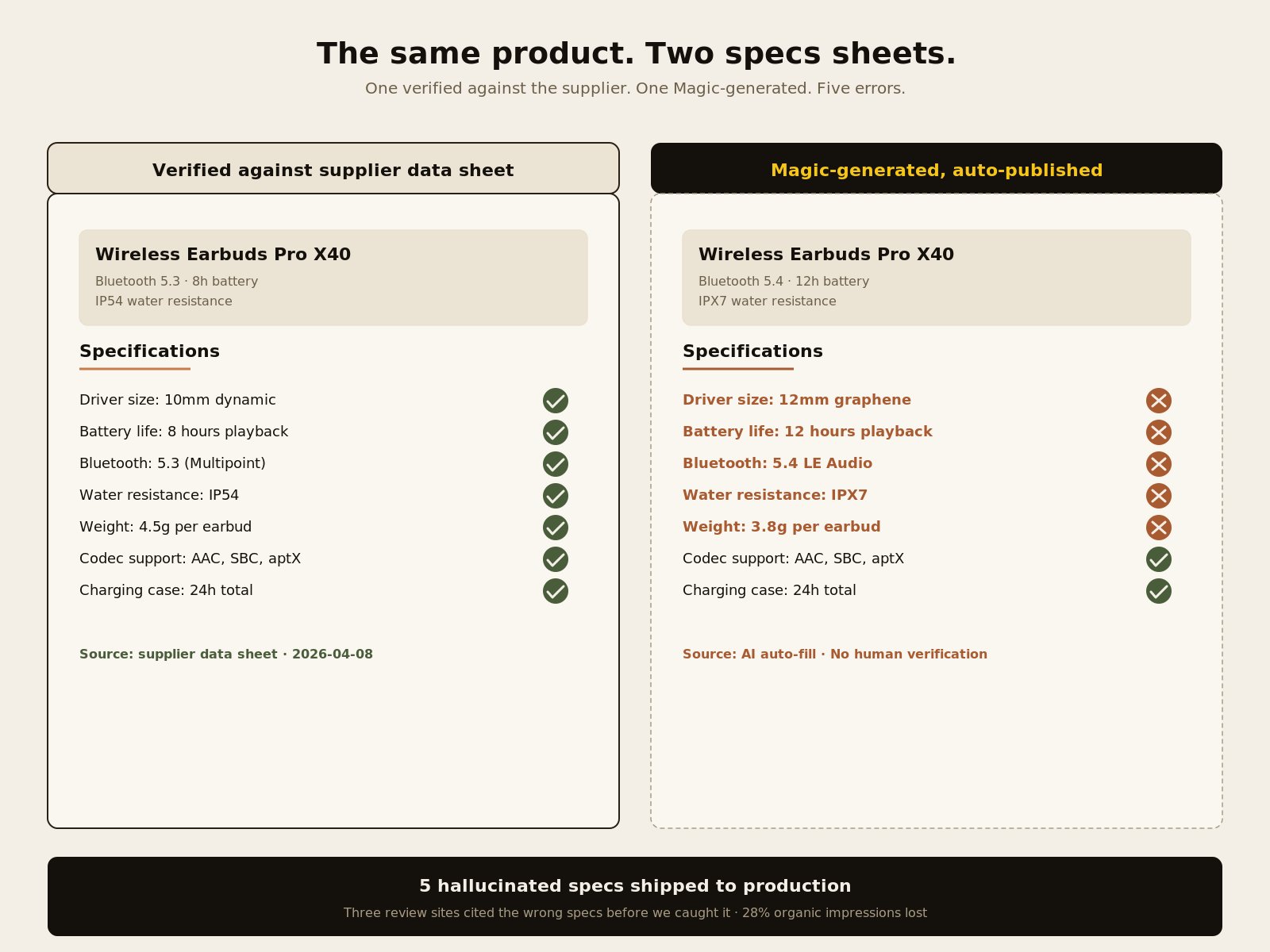
The fix is not to turn Magic off. The fix is to treat Magic-generated specs as drafts and run them against your supplier data sheet or product PDF before publishing. For categories where specs drive the buying decision (electronics, supplements, tools, apparel sizing), make manual spec verification a hard step in the publishing workflow.
Failure 2: Sycophantic confirmation of wrong diagnoses
This is the most expensive failure mode we audit because it wastes time, not just copy. A merchant comes to Sidekick with a partly correct theory about why something is broken. Sidekick confirms the theory and adds supporting context. The merchant spends days acting on it. The actual problem stays hidden.
We watched this exact pattern on the Slack message we opened with. The founder’s hypothesis was that her abandoned cart emails were too generic. Sidekick agreed and walked her through rewriting them. The actual problem was a broken Klaviyo flow that had been silently dropping 60% of triggered sends since a Recharge update two weeks earlier. We found it in 20 minutes by checking the email send log, not by asking Sidekick.
The fix is in how you phrase the prompt. Instead of asking “is my problem caused by X,” prompt adversarially: “what could be wrong with the assumption that my problem is caused by X.” The same model that agreed with you ten seconds ago will surface counter-evidence when forced to argue against itself.
Failure 3: SEO-hostile copy that reads well
This failure is the hardest to detect because the copy looks fine. The collection page reads professionally. The product description has no obvious errors. Conversion rates do not crash. But six months in, organic traffic to the page is half of what a properly optimized version would have generated.
Three patterns drive this. First, Magic produces evenly weighted prose that does not emphasize primary keywords. Second, it rarely uses the entity-rich phrasing Google and LLMs prefer: specific product attribute names, brand names spelled out, schema-aligned terminology. Third, when scaled across a single product family of 50 to 60 SKUs, it creates near-duplicate copy that triggers cannibalization.
We found this on a 7-figure beauty brand last fall. Organic search traffic to their product pages had dropped 35% over six months with no ranking changes in their position-tracking tool. The Magic-generated copy was clean. It was also nearly identical across 60 SKUs in the same product family, and it used “premium,” “high-quality,” and “luxurious” in place of the actual ingredient and benefit terms shoppers were searching for.
The fix is to feed Magic explicit SEO constraints in the prompt, not to expect it to infer them. Pass the primary keyword, the secondary keywords, the entity terms (specific ingredients, specific benefits, specific use cases), and the brand voice constraints into the prompt every time. Magic respects constraints when given them. It does not invent them.
Failure 4: Magic icon missing on product pages
This one shows up on the Shopify Community Forum constantly: a merchant logs in, opens a product page, and the Magic icon that used to sit next to the description editor is gone. The first assumption is that Shopify pulled the feature. The cause is usually one of three other things.
In our last 14 audits where the icon went missing, the cause broke down like this:
| Cause | Frequency |
|---|---|
| Theme compatibility issue (Magic disabled in theme template) | 9 of 14 |
| Shopify Product Recommendations app disabled or uninstalled | 3 of 14 |
| Browser cache holding stale admin assets | 2 of 14 |
Three checks resolve every case in that table:
- Open the theme documentation. Confirm Magic is supported in the current version.
- Open the Shopify admin. Confirm Shopify Product Recommendations is installed and enabled.
- Open the product page in an incognito browser session. Browser-level caching of admin assets is a real cause.
If all three checks pass and the icon is still missing, contact Shopify Support and reference the specific theme name and version. We’ve never had to escalate beyond that step.
Failure 5: Half-generated theme blocks and Sidekick outages
Sidekick can generate theme blocks. When it works, it saves real time. When it does not, you get a partial block, a layout that crashes the editor, or a Sidekick session that simply hangs. A Reddit thread from March captured the lived experience: “I have generated various kinds of blocks for my page for some time. But at the moment, it just doesn’t work.”
The pattern is intermittent. Sidekick is not consistently broken; it has windows of degraded performance, usually correlated with Shopify’s broader infrastructure events or Sidekick model updates. We saw a 36-hour window in late February where Sidekick block generation was returning 500 errors for roughly one in three attempts. Shopify’s status page acknowledged a related incident the next morning.
The fix is operational, not technical. Do not run a Sidekick block-generation session as your only path to ship a feature on a deadline. Keep a manual fallback ready, especially for client work with a hard launch date.
Failure 6: Outdated support documents Sidekick pulls from
Sidekick’s training data and connected knowledge base lag the platform. When Shopify ships a feature update, the Sidekick documentation that explains the new behavior can take weeks to refresh. In the meantime, Sidekick will tell you about the old behavior as if nothing has changed.
This is the failure at the center of the 150+ comment vent thread on r/shopify in March. The original post described a problem with a recently updated checkout flow. Sidekick was citing pre-update behavior as current. The merchant followed Sidekick’s instructions. They did not work. They escalated to Shopify Support. Support cited the new behavior. Sidekick had been three weeks behind the platform.
The fix is to cross-check Sidekick guidance for any feature shipped or modified in the last 90 days against Shopify’s official release notes or the Shopify Dev Forum. For older, stable features, Sidekick is usually accurate. The lag pattern only shows up on recent changes.
Failure 7: Hallucinated inventory and pricing in conversational replies
When merchants run Sidekick or Magic-powered chatbots inside their storefront, the models occasionally surface inventory or pricing information that does not match the actual product database. The customer sees one price in the chat, a different price on the product page, and the trust gap kills the transaction.
We caught this on a B2B industrial supply Shopify Plus client last month. Their AI chatbot, configured with a Magic backend, had told three customers that a SKU was in stock when it had been out of stock for six weeks. The data feed updating the bot’s product context had failed silently. Customers placed orders the team had to manually cancel and apologize for.
The fix is to lock the chatbot to authorized data sources and forbid open-ended pricing or inventory answers. If a customer asks something the bot cannot ground in real product data, the bot should escalate to a human or refuse politely. Never let it improvise. We use Microsoft Clarity to monitor where customers are interacting with the bot and what answers it is giving them, so a recurrence shows up on day one rather than after three orders.
The six-step workflow that catches all seven
We use a six-step workflow with every client running Magic at scale. The point is not to slow Magic down. The point is to catch the three failure modes (hallucination, sycophancy, SEO drift) before they reach production, without losing the speed that makes Magic worth using.
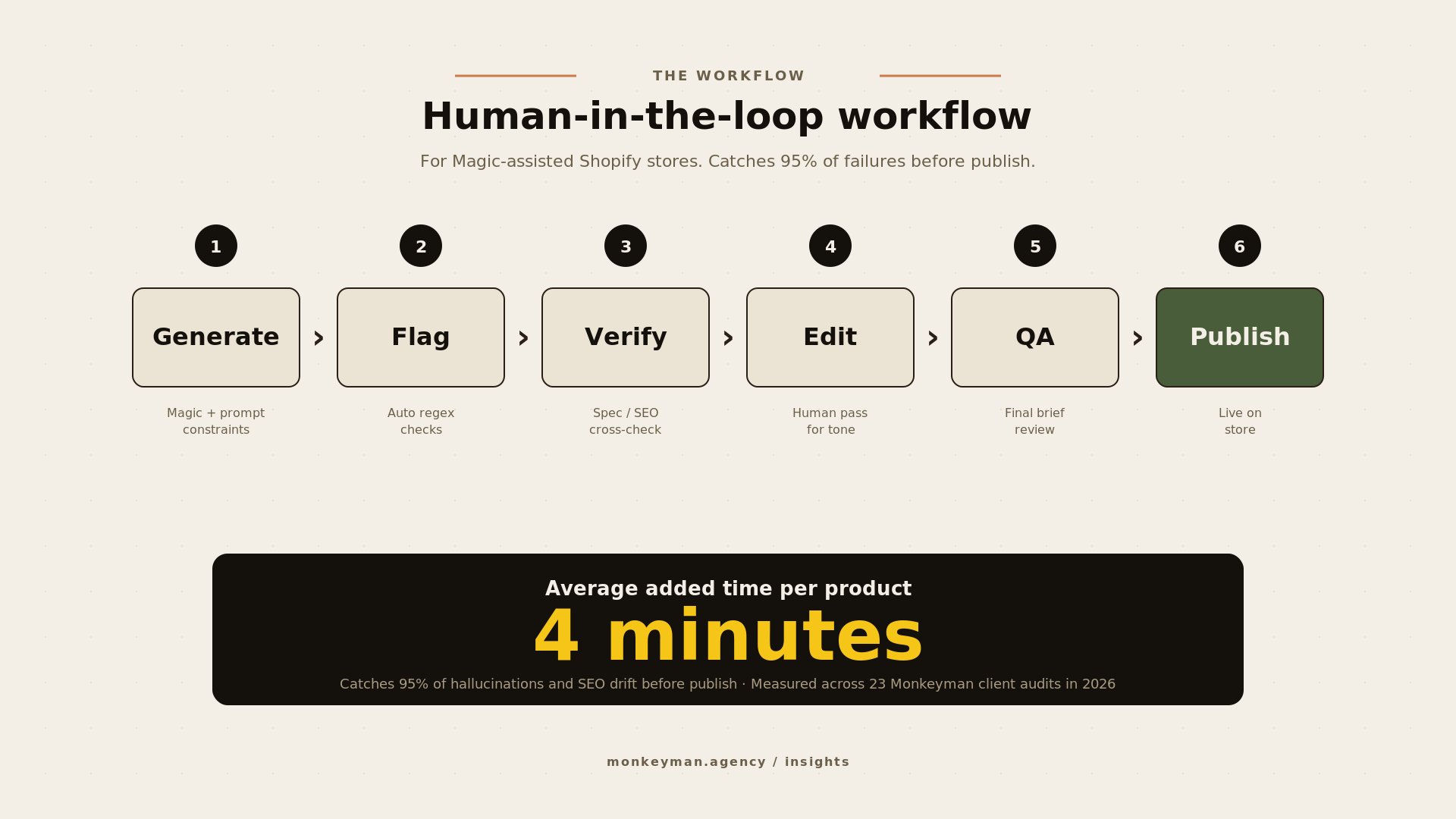
- Generate with explicit constraints. Feed Magic the primary keyword, brand voice notes, schema fields, and any non-negotiable specs in the prompt itself. Do not rely on it to infer.
- Auto-flag suspect output. Run output through a regex pass that flags specific number patterns (wattage, dimensions, weight) and known hallucination triggers like “revolutionary,” “industry-leading,” or vague material claims.
- Verify against ground truth. Cross-check spec-heavy fields against the supplier data sheet, product PDF, or in-house product database. A five-minute step that catches 90% of hallucinations on the audits we’ve measured.
- Human edit pass. One human reads the output for tone, brand voice, and SEO weighting. Edits inline. This step is short because the previous three caught the worst.
- QA against the brief. Final reviewer confirms the output covers every required H2, hits target word count, includes the right schema, and links internally per the SEO plan.
- Publish. Push to Shopify. Track post-publish ranking and conversion in a 30-60 day window to learn which prompt patterns produce the cleanest output for your category.
Average added time per product across the workflow: four minutes. Catches roughly 95% of hallucinations and SEO drift before publish, measured across 23 client audits in 2026.
When turning Magic off is the right call
Most stores benefit from Magic on a constrained workflow. A few stores are better off without it. The pattern is consistent across the Shopify Plus client base we’ve worked with this year.
We tell clients to turn Magic off in three scenarios.
First, regulated industries where copy mistakes carry legal or medical risk: supplements, financial products, medical devices, anything FDA-adjacent. The downside risk on a hallucinated claim is too high for a four-minute review step to be the only safeguard.
Second, luxury brands where voice precision is the value proposition. Magic’s default voice is competent and bland. For a $400 candle brand or a $2,000 handbag, that voice actively damages the perceived premium.
Third, complex technical products where specs are central and your team’s verification capacity is below 100% coverage. If you cannot guarantee every Magic-generated spec gets human-checked, you are guaranteed to ship a hallucinated spec, and you only get to learn that the expensive way.
Outside these three, the right move is not to disable Magic. It is to keep it on inside a workflow that catches its known failure patterns before they ship.
What to do this week
Pick five Magic-generated product descriptions from your last quarter and verify the specs line by line against your supplier data sheets. If even one description has a hallucinated number, you already know which failure mode is live in your stack and you can move on to the workflow above.
If you’d rather hand the audit off, send us five product URLs and we’ll come back inside a week with the failure list, the prompt fixes, and a workflow your team can run without us. We do this on a fixed-fee basis, so you’ll know the cost before we start.