Shopify Review Apps: What You Need and What to Skip
What a Shopify review app should do, which features are worth paying for, how free and paid plans compare, and how to set one up without slowing your store.
A Clutch Verified Shopify agency
Rated 5.0 out of 5 stars by our clients
A shopper lands on your product page from an ad. They like the photos and the price looks fair, but they’ve never heard of you. The first thing most of them do is scroll down to the reviews. If there aren’t any, or there are three from 2023 with no photos, a lot of them leave.
Shopify used to give every store a free reviews app. It removed it in May 2024, so now every store picks a third-party one, and there are hundreds. We install and set up review apps on almost every store we build or redesign, and the same thing keeps happening: stores pay for features they never switch on and skip the two or three settings that actually bring in reviews.
This post covers what a review app needs to do, what’s worth paying for, how free and paid plans compare, and how to set one up without slowing your store. A note before we start: we build our own review app, ReviewMate, through APPWRK, the company behind Monkeyman. We’ll say where it fits and where another app is the better choice.
The short answer
- Start free. A free plan with photo and video reviews and a good product page widget is enough for a new store.
- Pay for automation and Google. Around US$10 to US$15 a month buys automatic review requests and syncing your reviews to Google. That’s the upgrade most stores should make first.
- Go bigger only for integrations. Pick a fuller platform when your reviews have to feed Klaviyo, a loyalty program or ad tools, not because it has more widgets.
What a review app does
A Shopify review app does four jobs. It asks customers for reviews, collects their stars, text, photos and videos, lets you check them before they go live, and shows them on your store and in Google. Here’s how one review moves through those steps. Press play, or just scroll.
The step that makes the biggest difference is the second one. Most happy customers will leave a review if you ask at the right time and make it easy. Very few will go looking for a review form on their own.
The features that actually matter
1. Photo and video reviews
A photo from a real customer answers questions your product shots can’t: how the fabric looks in daylight, how big the bag is on a real person, whether the colour matches. It matters most for clothing, jewellery, beauty and home products. Every app worth considering supports photo reviews, and both ReviewMate and Judge.me include unlimited photo and video reviews on their free plans.
2. Automatic review requests
This is the feature that decides how many reviews you get. The app emails each customer a set number of days after delivery with a short ask and clickable stars. Without it, you’re asking by hand, which stops happening the week you get busy. On most apps this sits in the paid plan: ReviewMate Premium and Judge.me Awesome both include automatic requests, and Loox includes request emails on its free plan for stores up to 500 orders a month.
3. A widget that fits your product page
The widget is what shoppers actually see. You want a rating summary near the price, and the full reviews lower down, with photos easy to open. How they’re laid out matters more than how many widget types an app offers. Switch between the three common layouts below to see the difference.
A list with a rating summary works best on the product page, where shoppers want detail. A carousel suits the home page or a landing page, where you want a quick hit of social proof. A grid works for a dedicated reviews page with lots of photos.
4. Stars in Google
There are two kinds, and they work differently:
- Stars in normal search results come from review schema on your product pages, a bit of structured data that tells Google your rating and review count. Most review apps add it. Check it with Google’s Rich Results Test, because a theme and an app can both add product schema and confuse Google. Our guide to Shopify product schema covers how to check this.
- Stars in Google Shopping need your review app to send reviews to Google Merchant Center. Google only shows product ratings once you have at least 50 reviews across your products in that feed, and the feed has to be updated at least monthly.
Both are worth having. Stars make your result stand out next to competitors that don’t have them.
5. Moderation and replies
You need to see reviews before they go live, publish the genuine ones, and reply publicly to the unhappy ones. Hiding every bad review is a mistake: shoppers trust a 4.7 with a few honest complaints more than a perfect 5.0, and a calm reply to a complaint often sells better than the praise does.
6. Import and export
If you’ve collected reviews anywhere before, from an old app or another platform, you’ll want them on the new one. That’s usually a CSV export and import, with product handles or IDs that have to match. Check the importer exists before you commit, and keep a copy of every export.
What you don’t need to pay for yet
Paid tiers on bigger apps add AI-written review summaries, AI replies, translation, referral programs, Q&A widgets and 15 or more widget types. Some of these are useful at scale. For a store doing under a few hundred orders a month, none of them will move sales as much as getting more reviews in the first place. Switch on automatic requests and Google syncing first, then see what’s missing.
Free vs paid: how the main apps compare
Prices below are from each app’s Shopify App Store listing in November 2026. Listings show prices in your local currency and they change, so check before you install.
| ReviewMate | Judge.me | Loox | |
|---|---|---|---|
| Free plan | Yes: unlimited photo and video reviews, reviews widget and carousel, dashboard, chat support | Yes: unlimited reviews, photo and video, widgets, carousels, Google rich snippets, review importer | Yes, up to 500 orders a month: request emails and reminders, photo review discounts, 17+ widgets, rich snippets |
| Main paid plan | Premium, about US$10 a month | Awesome, about US$15 a month | Convert, about US$50 a month for 300 orders, plus about US$50 per extra 300 |
| Paid plan adds | Automatic review emails, three widget layouts, Google sync, ratings in search results, reviews on Google Business | Auto reminders, 130+ integrations including Klaviyo, Google Shopping, Meta and TikTok sync, AI tools | Video reviews, AI tools, referrals, Google, Meta and TikTok sync, integrations and API |
| Best for | Stores that want photo reviews free and Google sync at the lowest monthly price | Stores that need integrations with email, support and ad tools | Visual brands that want photo-led widgets and referrals |
Yotpo is the other big name. Its pricing depends on the plan and your order volume, so it’s worth a quote if you’re a larger brand that also wants loyalty and SMS from the same company.
Not sure which plan your store needs? Answer five quick questions.
Where ReviewMate fits
We built ReviewMate because most of our clients needed the same short list: photo reviews, a clean widget that matches the theme, automatic requests and stars in Google, without paying for a platform full of features they’d never switch on.
It’s a good fit if you:
- Want unlimited photo and video reviews on a free plan.
- Want automatic review emails and Google syncing for about US$10 a month.
- Want your reviews on your Google Business profile as well as your product pages.
- Are building or redesigning your store with us, so we can set the widgets up to match your theme.
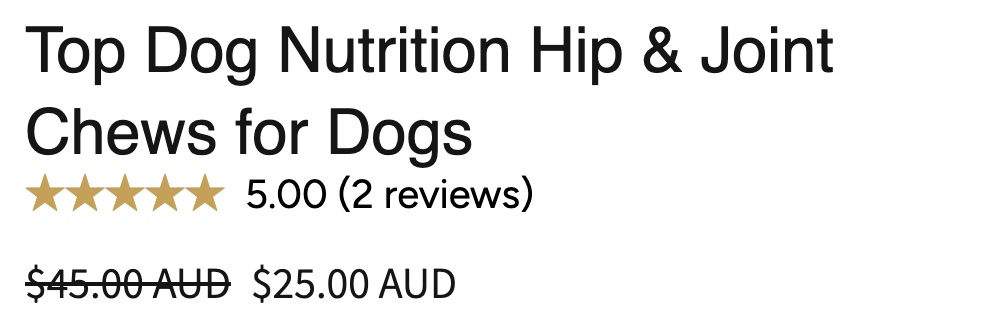
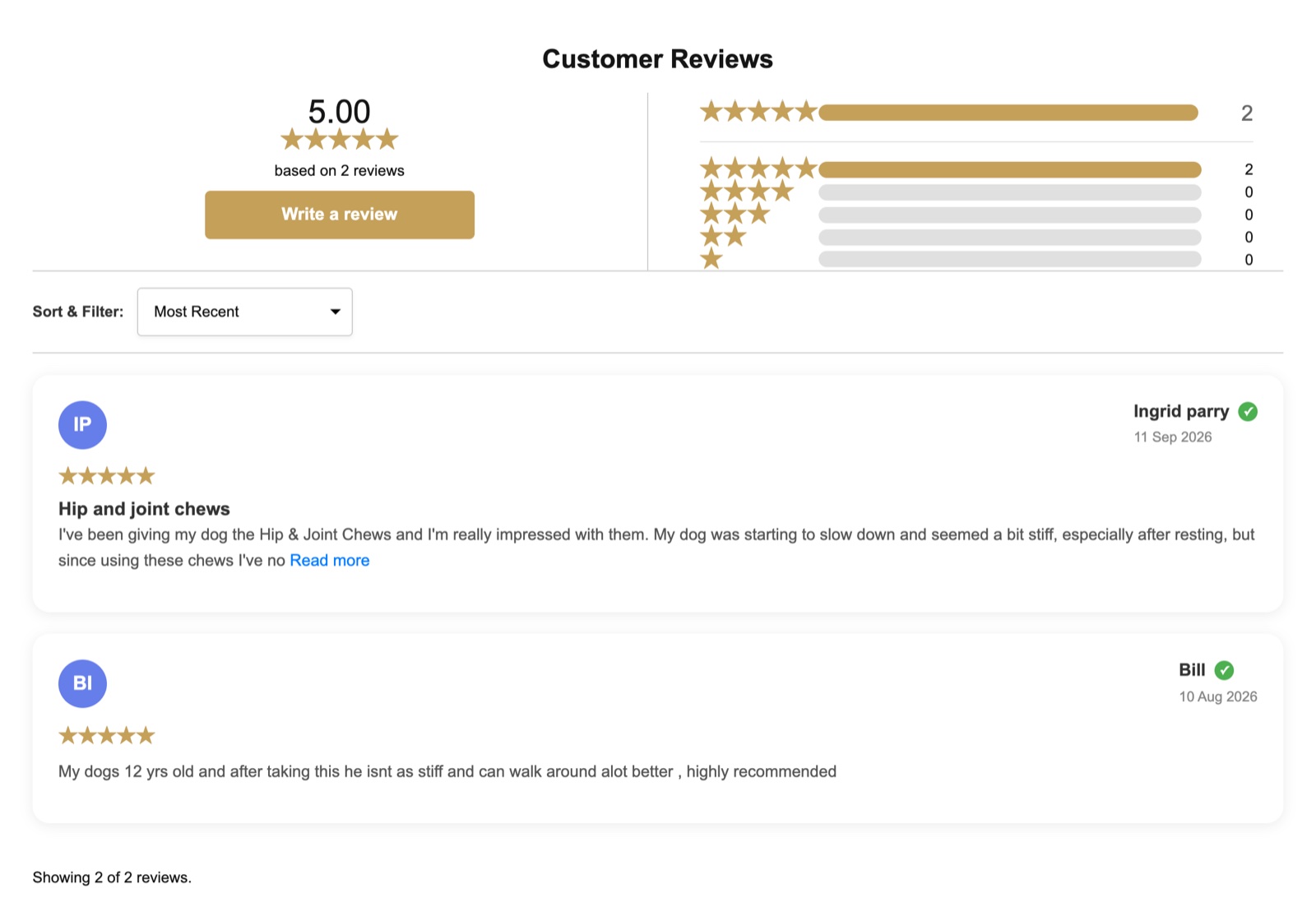
Here’s what it looks like on a live store. ReviewMate adds two theme blocks: a star rating under the product title and a reviews widget further down the page.
 1
 2 3
It isn’t the right fit yet if your reviews need to flow into Klaviyo, a loyalty program or ad platforms. Its listing doesn’t name those integrations, while Judge.me’s paid plan lists more than 130. We’d recommend Judge.me Awesome or Loox for that, and we set those up too.
ReviewMate launched in March 2025, so it has far fewer reviews on its own listing than the big apps. That’s the honest trade-off with any newer app: less history, but a team you can reach directly.
How to set up a review app without slowing your store
- Work in a duplicate theme. Install the app, add its blocks to a copy of your live theme and preview it before you publish.
- Use the app’s theme blocks. Add the star rating under the product title and the reviews widget lower down through the theme editor, rather than pasting code into theme files. It’s cleaner to change later and easier to remove.
- Keep one source of review schema. If your theme already outputs product schema, check that the app’s rating ends up in it once, not twice. Test a product page in Google’s Rich Results Test.
- Load photos lazily. Review photos below the fold shouldn’t load before the page is usable. Check your product page speed before and after, using our Shopify speed playbook as a guide.
- Set the request timing. Around 7 to 14 days after delivery for most products, longer for things people need time to try, like skincare. One reminder at most.
- Import your old reviews. Export from the old app first, import into the new one, then check a few products to make sure the counts match.
- Remove the old app properly. Uninstalling doesn’t always remove its code. Our guide to removing leftover app code shows how to find and clean it up.
At a glance: what to set up and when
| Stage | What to set up | Why |
|---|---|---|
| Launch | Free plan, product page widget, star rating near the price | Somewhere for the first reviews to show |
| First 100 orders | Ask early customers by hand, add a card in the parcel | Get past zero reviews fast |
| Steady sales | Automatic review requests, photo review prompts | Reviews keep coming without anyone remembering |
| 50+ reviews | Google Merchant Center sync, check search schema | Stars in Google Shopping and search |
| Scaling | Integrations with email, loyalty and ads | Reviews start powering other channels |
Why we’d tell you to start free
We’d rather you got your first 50 reviews on a free plan than paid for a platform you don’t use yet. The app matters less than the setup: ask every customer at the right time, show the reviews where shoppers decide, and get them into Google.
If you’d like help, we set up review apps on Shopify stores, ReviewMate and others: the widgets, the request emails, Google syncing and the speed check. Tell us what you’re using now and we’ll show you what’s missing.