HomeFields
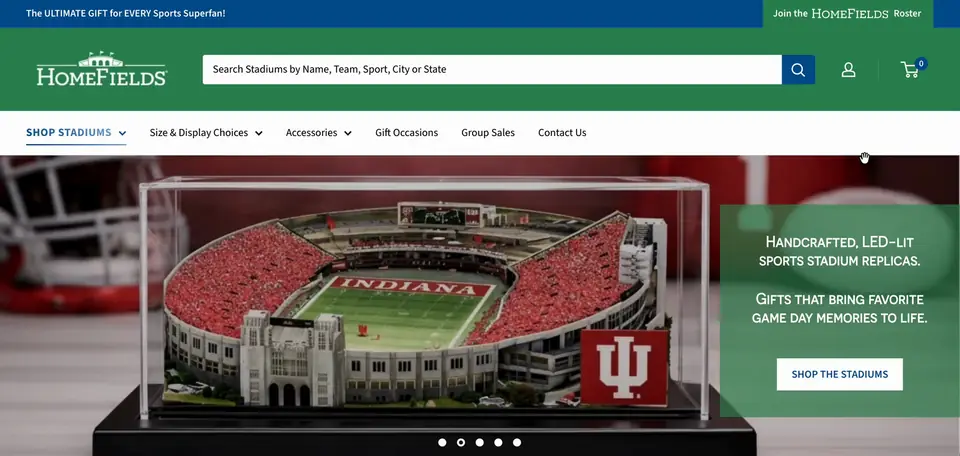
homefields.com ↗HomeFields is a US brand that has handcrafted lighted replicas of NFL, NCAA, MLB and NHL stadiums in Alpharetta, Georgia since 1999. We redesigned the store on Warehouse with a new homepage, a Shop the Sports section and editable page templates.
- Niche
- Specialty
- Engagement
- Feb 2026 to Aug 2026
- Services
- Shopify redesign, homepage design, product navigation, metafield product template, editable page templates
- Platform
- Shopify
The brief they came with
HomeFields sells 3D lighted replica ballparks and stadiums. Customers buy them as Lighted Stadium Sets or Standalone Stadiums, along with accessories and gift cards. The store was live and taking orders, so every change had to happen on an unpublished theme. The team wanted a cleaner store they could keep updating themselves.
The brief started with choosing a theme. The team liked Warehouse and its three presets, Warehouse, Mesh and Wood. From there it covered a new homepage, a new product navigation, sign-up and contact forms, and templates for the pages under each navigation dropdown.
The problem
The old product grouping split items into sets and standalones. That did not match how people shop. The team regrouped everything into Lighted Stadium Sets, Standalone Stadiums, Accessories and Gift Cards, so the homepage and navigation had to follow the new structure.
The product images did not sit well together. A standalone stadium looked bigger than a full stadium set, even though the sets are larger. Accessories blended into the white background, and the gift card was cropped. The first images, pulled from Word documents, were too blurry to use.
The site was live, and the Warehouse trial only allowed text, image and section changes. We could not change layouts or publish anything until the theme was bought and the team approved the work.
The team wanted to build new pages themselves from the theme editor. These pages had to map to the navigation dropdowns, and they had no price or stock to show. A product page layout would not work for them.
Shopify's newer customer accounts limit how much the default login and sign-up screens can be customized. So the account form the team specified could not be matched exactly.
What we built
- 01 Picking Warehouse and mixing its presets We shared a shortlist of premium and free themes, including Warehouse, Multi, Enterprise and Horizon. The team chose Warehouse and asked how the Warehouse, Mesh and Wood presets compared. We explained that presets are just demo layouts. Once the theme is bought, every section from all three is available, so we could mix sections across presets. The team installed Warehouse on the store and added us as collaborators. All of our work stayed on the unpublished copy.
- 02 A homepage built over six feedback rounds We started the homepage the day the theme was purchased and shared a preview the next evening. From there the team sent six feedback documents, dated 4.7, 4.8, 4.10, 4.15, 4.18 and 4.27. We worked through each round on the preview theme and talked through the open points on calls. We updated the hero rotation with new stadium photos and switched the SVG logo from green to white to suit the color scheme. We also replaced the boilerplate copy with the team's new text about the Alpharetta workshop.
- 03 Shop the Sports and Shop the Products For Shop the Sports, we tried two layouts and sent a screen recording and a screenshot. The team picked the static version with the sports in one line, and we moved the sport names and link boxes below the images in green. Shop the Products follows the new grouping: Lighted Stadium Sets, Standalone Stadiums, Accessories and Gift Cards. We rescaled the images so the sets read larger than the standalones. Instead of plain white, we put them on a subtle light gradient.
- 04 Sizing section, navigation and form fields The sizing section uses the team's three-size stadium visual. We placed it on a background so it would not look stretched. The product navigation now follows the new structure, with Display Covers, Display Bases, Power Cords, Display Sets and Accessory Sets under Accessories. We added placeholder fields for the roster sign-up, which asks for email, first name, last name, zip code and favorite teams, ready to connect to Klaviyo. We also flagged that filters and search depend on product tags.
- 05 A product template driven by metafields Next, we built a product template with its sections mapped to product metafields. Every product uses the same layout, and the content changes from product to product. To test it, we loaded the team's Stadium Set content into the Alabama Crimson Tide Bryant-Denny Stadium product, because the Lighted Stadium Set product was in draft with no variants. The team liked the layout. They also told us they needed the same look for pages that are not tied to a single stadium.
- 06 Editable navigation pages and handover So we built a Lighted Stadium Sets page, linked it in the navigation and gave it its own template made from Warehouse sections. That way the team could edit it from the theme editor. The team then duplicated it to start a Standalone Stadiums page. On a call, we showed them how to assign the new template to that dropdown page. After that, they built several more pages on their own.
Results
Stack & apps
- Shopify Platform
- Warehouse Theme, customized
- Warehouse presets Sections mixed across Warehouse, Mesh and Wood
- Product metafields Dynamic product page content
- Custom page templates Team-editable navigation pages
- Klaviyo Roster sign-up fields prepared, not yet connected


Want this for your store?
Tell us what's wrong, or what you're trying to build, and we'll take a look at your storefront.
