Love Mahjong Boutique
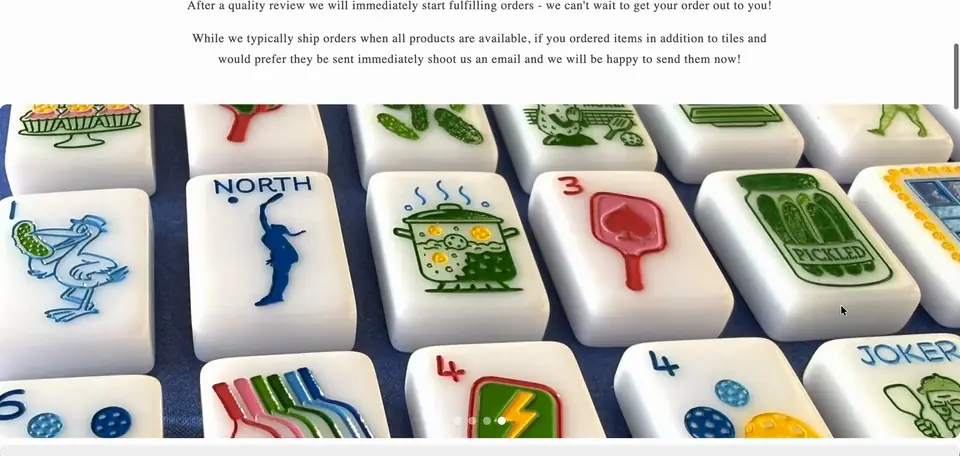
lovemahjongboutique.com ↗A brand selling mahjong tiles it designs itself, with a Tennis Set and a Pickleball Set under the tagline "Play What You Love." We redesigned the store on Dawn with a wholesale program, pre-orders and a gift wrap option.
- Niche
- Specialty
- Engagement
- Live
- Services
- Shopify website design, Wholesale and pre-order setup, Post-launch support
- Platform
- Shopify
The brief they came with
Love Mahjong Boutique sells mahjong tile sets the team designs themselves. It started with a Tennis Set and a Pickleball Set, and a Garden Set was on the way. The store ran on Shopify's free Dawn theme with three main pages, and it was about a month from launch. The team wanted it to look professional and to carry their tagline, "Play What You Love," in both words and feel.
The brief covered a redesign of the Home, About, Collection, Product, FAQ, Contact and policy pages. It also asked for search, filters, an email popup, abandoned cart emails, room for future mats and bags, and ongoing support after launch.
The problem
The tagline was missing. "Play What You Love" is the idea behind every set, but it did not appear anywhere on the site. Visitors saw tiles without the fun, premium feel behind them.
The structure was too small for the range. Three main pages and one product list could not handle a coming-soon Garden Set, let alone mats, storage and accessories. A set that had not been released yet showed as "Sold out," which looked like a stock problem.
Gifting had no place. The team wanted buyers to add gift wrap and a note to a specific set, and the store had no way to do that.
Wholesale buyers had no way in. After talking to buyers, the team needed discounted pricing for approved stockists that stayed hidden from retail customers. When a discount rule later applied too widely, customers who had not been approved were getting wholesale prices.
The team wanted to run the store themselves. They planned to rewrite much of the wording and switch menu items on as new products launched, without waiting on a developer each time.
What we built
- 01 A homepage built around Play What You Love We started with the homepage. We built it in a draft copy of Dawn and shared desktop previews, so the live store stayed untouched. The tagline, which was missing from the old site, now leads the page. After the team's first review we enlarged the logo, moved the "Play What You Love" box above the images, and brought back the five photos from the original site in an auto-changing, fading slideshow. We disabled the scrolling star box and the bottom banner instead of deleting them, so the team can use them later.
- 02 About, collection, product and contact pages Next came the About page, then Contact, the collection page and the product page, starting with The Tennis Set. When the team sent a new yellow logo mid-build, we swapped it in and took the brand colors from it. We moved The Garden Set to the end of the sets and replaced "Sold out" with "Coming Soon." We also put the hero image before the text on mobile and turned Returns, Shipping and Privacy into editable pages. The FAQ page was dropped at the team's request.
- 03 A Shop menu that grows with the range Under Shop we added a dropdown for Tile Sets, Mats, Storage and Accessories. Each item can be switched on once products exist for it. All Products became a menu link instead of a collection. Collections can mix sets and other products, so the Pickleball collection can show the Pickleball Set next to matching mats and napkins. We sent a screen recording showing how to link each tab to its page, so the team can add Mats when they launch.
- 04 Gift wrap, an email popup and social links On each set's product page, buyers can add gift wrap and write a note to include with the gift. They choose this per set, not at checkout. We removed the present icon and the final sale, easy return and fast ship icons the team did not want. We added a newsletter popup that asks visitors for their email, set up abandoned checkout emails, and linked the Instagram and Facebook icons. Every section can be edited in the customizer, and we sent a video guide.
- 05 Wholesale accounts with tag-based pricing Buyers apply through a wholesale form. The team reviews each request in the app and approves or rejects it. We first tried B2B Wholesale, Volume Discount, but its free plan showed discounted prices to every customer. We moved to ECA: Easy B2B Wholesale, which tags approved buyers as Wholesale. Those buyers get 50% off at cart once they pass the order minimum. The registration form includes an optional upload for a tax exempt form. The team chose free shipping on all wholesale orders.
- 06 Pre-orders, and fixes after launch The team installed Timesact Pre-order to take orders before stock arrived. We set it up to take a partial deposit and worked with the app's support to fix the partial payment option. After launch we removed the collection filters again when they reappeared and showed the team where gift wrap sits on product pages. We also took a cart error to the pre-order app's support after the app was disabled. In June we found the wholesale discount applied to every logged-in customer and limited it to approved Wholesale accounts.
Results
Stack & apps
- Shopify Platform
- Dawn Theme, customized
- ECA: Easy B2B Wholesale Wholesale applications and pricing
- Timesact Pre-order Pre-orders with partial deposits
- Shopify abandoned checkout emails Recover abandoned carts
- Custom gift wrap add-on Gift wrap and note per set
- Custom Shop menu Switch categories on as needed


Want this for your store?
Tell us what's wrong, or what you're trying to build, and we'll take a look at your storefront.