T is for Tame
tisfortame.com ↗A US brand making natural, organic hair products for unruly baby hair, made with coconut oil instead of harsh gels. We updated the store on Craft with a Black Friday homepage banner, two sale buttons and corrected landing page links.
- Niche
- Baby & Kids
- Engagement
- Live
- Services
- Shopify website updates, Homepage sale banner, Landing page links
- Platform
- Shopify
The brief they came with
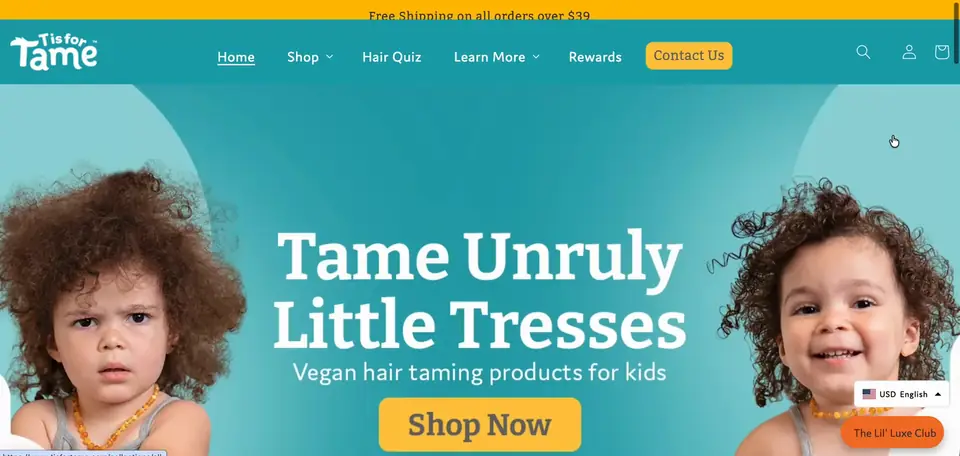
T is for Tame makes natural, organic hair products for unruly baby hair. Its coconut oil formulas smooth hair into place without leaving it stiff, sticky or greasy. The store already ran on Craft, and the team came back to us with updates ahead of Black Friday.
The brief had three parts. Move the sale banner to the front of the homepage and set it to 25% off bundles and gifts & sets, November 29 to December 2. Add a link to the Gifts & Sets page. Tidy the Locate page logos and add Market Street under Amazon. The team then paused the Locate page work and asked us to finish the banner in time to publish on Monday.
The problem
The sale banner was not the first slide. On a homepage slideshow, the first slide is the one most visitors see. A Black Friday offer sitting behind other slides would be easy to miss during a four-day sale.
The banner had one button. Shop Deal Now went to the bundles landing page only, so shoppers looking for gifts & sets had no direct path from the offer. The discount covered both, so the banner needed to point to both.
The copy had to be exact. The first preview carried free gift and free shipping lines that the offer did not include. Promising extras that are not there at checkout costs trust, so those lines had to go.
The links kept moving. The first links pointed to the wrong pages. Then the team built a new Black Friday landing page the day before the sale started. Then an edit sent the button back to the old page partway through the sale. During a short sale, a button that lands on the wrong page wastes the visit.
What we built
- 01 Sale banner moved to the front We reordered the homepage slideshow on Craft so the sale slide comes first. We built the change on a preview theme and shared the preview the same day the team narrowed the brief to the homepage. That let them check the banner against the live store's content before anything went public. Nothing changed on the published theme until the team was ready to publish it themselves.
- 02 Black Friday copy, edited to the word We set the slide copy to the team's exact offer: 25% off bundles and gifts & sets from November 29 to December 2. After the first review we took out the free gift and free shipping lines, because the offer did not include them. After the second review we removed the commas after bundles and sets. The team set the discount in the back end themselves so it applied at checkout from November 29.
- 03 Two buttons on one sale slide The slide had a single Shop Deal Now button pointing to the bundles landing page. We added a second button for the Gifts & Sets page, so both halves of the offer had their own route from the homepage. The team approved the preview after two short rounds of copy edits and published the theme on the Monday, as they had planned.
- 04 Fixing the links before the holiday After publishing, the team noticed the buttons were not reaching the right pages. They were out of the office for a US holiday from Wednesday, so this had to be fixed fast. We pointed Gifts & Sets to /collections/accessories and Shop Deal Now to the Complete Hair Care Set page at /pages/complete-hair-care-set. The first links went in the same day the team reported the issue, and the corrected pair the next morning.
- 05 Switching to the Black Friday landing page The day before the sale opened, the team launched a dedicated bundles page for Black Friday at /pages/complete-hair-care-set-black-friday-sale. They asked us to swap Shop Deal Now over to it. We checked the details the next morning and had the button updated on the first day of the sale, so shoppers clicking through from the homepage landed on the new Black Friday page.
- 06 Handing the links back to the team Partway through the sale, the button went back to the old landing page. Rather than leave the team waiting on us for every link change, we sent a direct theme editor link to the exact slide inside the slideshow section. The team updated the link themselves the same day, and they can now change the banner buttons whenever a landing page moves.
Results
Stack & apps
- Shopify Platform
- Craft Theme, customized
- Craft slideshow section Homepage sale banner
- Shopify preview themes Review before publishing
- Custom two-button sale slide Separate bundles and gifts routes


Want this for your store?
Tell us what's wrong, or what you're trying to build, and we'll take a look at your storefront.